Category: Electronics

  • Must-Have Accessories for Content Creators

    In today’s digital age, content creation is more accessible than ever, but quality content requires more than just creativity. The right accessories can make all the difference in ensuring your videos, photos, or streams look and sound professional. Whether you’re a vlogger, photographer, or podcaster, here are the must-have accessories every content creator should own.


    1. Tripods and Stabilizers

    A stable camera is critical for professional-quality content.

    • Tripods: A sturdy tripod ensures your shots are steady, especially for long-form content like interviews or tutorials. Look for adjustable, lightweight models that are easy to carry.
    • Gimbals and Stabilizers: For creators who film on the go, gimbals provide smooth, cinematic footage by reducing shake and vibration. They’re essential for travel vloggers and action content creators.

    2. High-Quality Microphones

    Great visuals can be ruined by poor audio. Invest in a microphone that suits your style of content.

    • Lavalier Mics: These clip-on microphones are perfect for interviews and tutorials, providing clear, hands-free audio.
    • Shotgun Mics: Ideal for outdoor or directional audio capture, shotgun microphones help isolate your voice from background noise.
    • USB Condenser Mics: For podcasters and streamers, USB mics offer excellent sound quality and easy setup with computers.

    3. Lighting Kits

    Lighting is one of the most critical elements of content creation.

    • Ring Lights: These are perfect for close-up shots, beauty tutorials, and live streams. Ring lights provide even illumination, minimizing shadows.
    • Softbox Lights: For studio setups, softbox lights diffuse harsh light, creating a more professional look for videos and photos.
    • Portable LED Panels: On-the-go creators can benefit from portable LEDs that are lightweight, rechargeable, and adjustable in brightness.
    Must-Have Accessories for Content Creators
    Must-Have Accessories for Content Creators

    4. Backdrops and Green Screens

    Create a consistent and professional background for your content.

    • Backdrops: A plain or artistic backdrop helps set the tone of your video or photos. Fabric backdrops in neutral tones are versatile and budget-friendly.
    • Green Screens: For creators who want to add custom backgrounds, green screens open endless possibilities for creative content.

    5. External Storage Solutions

    Content creation involves large file sizes. Reliable storage is essential.

    • External Hard Drives: Opt for high-capacity drives to store raw footage and finished projects. SSDs are faster and more durable than traditional hard drives.
    • Cloud Storage Subscriptions: Services like Google Drive, Dropbox, or Adobe Creative Cloud allow easy access and sharing of your files.

    6. Editing Software and Accessories

    Efficient editing is key to polished content.

    • Editing Software: Programs like Adobe Premiere Pro, Final Cut Pro, or DaVinci Resolve are industry favorites for video editing. For photos, Adobe Lightroom and Photoshop are essential.
    • Graphics Tablets: For creators who work with design or retouching, a tablet like the Wacom Intuos provides precision and ease of use.

    7. Portable Power Solutions

    Running out of battery can disrupt your workflow.

    • Power Banks: A high-capacity power bank is a lifesaver for creators who shoot on location.
    • Extra Batteries: Always have backup batteries for your cameras, microphones, and lighting gear to avoid downtime.

    8. Camera Accessories

    Enhance your camera’s functionality with additional gear.

    • Lenses: Invest in lenses suited to your content type. Wide-angle lenses are great for landscapes, while prime lenses provide excellent quality for portraits.
    • Filters: Polarizing and ND filters improve the quality of outdoor shots by reducing glare and managing light.
    • Camera Cage or Rig: For filmmakers, a cage offers mounting options for accessories like microphones, lights, and monitors.

    9. Tools for Live Streaming

    For streamers, dedicated accessories can elevate the viewer experience.

    • Capture Cards: These devices ensure high-quality streaming from your camera or console.
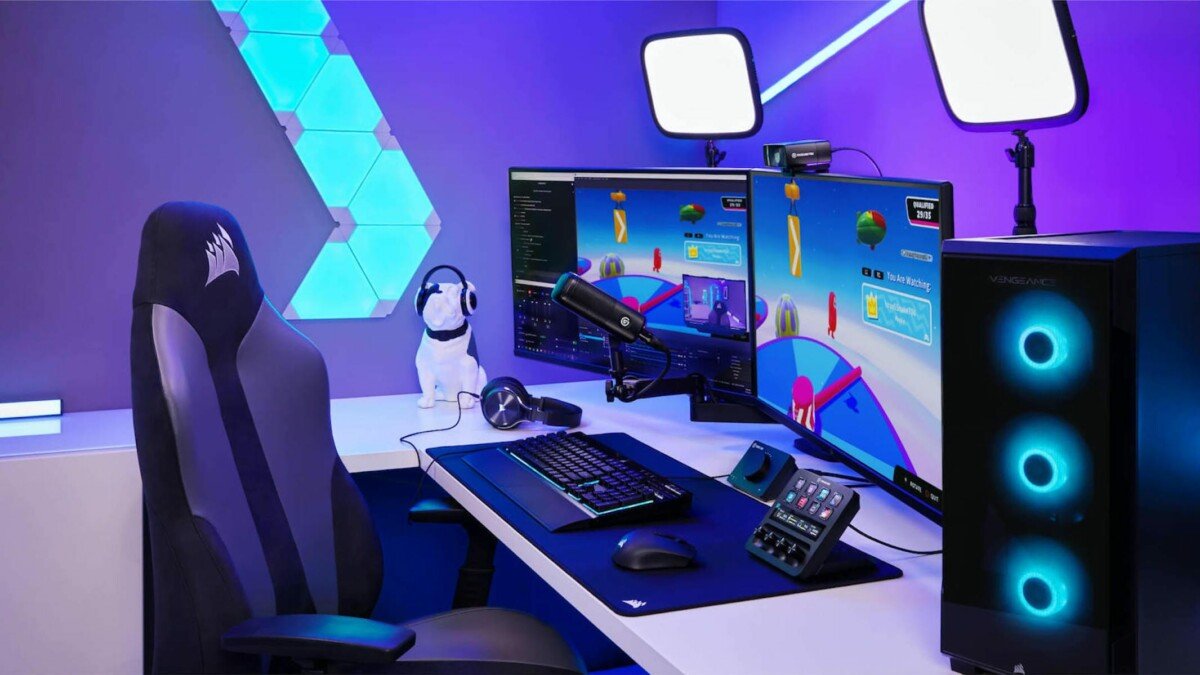
    • Stream Decks: A stream deck allows quick access to transitions, sound effects, and other controls during live streams.
    • Lighting for Streamers: Adjustable desk-mounted LED lights provide even illumination for face cams.

    10. Ergonomic Workspace Setup

    A comfortable workspace is vital for productivity.

    • Adjustable Desk and Chair: Invest in ergonomic furniture to prevent strain during long editing sessions.
    • Cable Management Solutions: Keep your workspace tidy and organized with cable ties and sleeves.
    • Monitor Calibrators: Accurate color grading requires a calibrated screen. Tools like the Datacolor SpyderX ensure your visuals look their best.

    Conclusion

    Having the right accessories can elevate your content, making it stand out in a crowded digital space. Whether you’re just starting or looking to enhance your setup, these tools will help you create high-quality, professional content. Invest in these essentials and watch your creativity flourish!


  • Smart Home Security Systems: What to Look For

    Smart Home Security Systems: What to Look For

    Smart home security systems provide peace of mind by protecting your home with advanced technology. Whether you’re upgrading your current system or investing in one for the first time, knowing what to look for ensures you choose the right setup. This guide breaks down the essential features and considerations for finding the perfect smart home security system.

    Smart Home Security Systems: What to Look For
    Smart Home Security Systems: What to Look For

    Why Invest in a Smart Home Security System?

    A smart security system offers benefits like remote monitoring, automation, and enhanced safety. It combines traditional home security with smart features, enabling you to:

    • Monitor your home in real-time from anywhere.
    • Receive instant alerts for suspicious activity.
    • Control locks, cameras, and alarms through a smartphone.

    What Are the Key Features to Look For?

    1. Comprehensive Monitoring

    A reliable system should monitor multiple aspects of your home, such as:

    • Motion detection: Identifies unauthorized movement.
    • Door and window sensors: Alerts you when entry points are opened.
    • Environmental sensors: Detect smoke, carbon monoxide, or water leaks.

    2. High-Quality Cameras

    Cameras are vital for capturing detailed footage. Look for features such as:

    • HD resolution: Ensures clear images.
    • Night vision: Provides visibility in low light.
    • Wide-angle lenses: Covers larger areas.
    • Two-way audio: Lets you communicate with visitors or potential intruders.

    3. Easy Installation

    Choose between:

    • DIY Systems: Affordable and simple to set up without professional help.
    • Professional Installation: Ideal for more complex setups requiring expert assistance.

    4. Mobile App Integration

    A mobile app is a must-have for remote control. Key app features include:

    • Real-time notifications for alarms or unusual activity.
    • Live streaming of camera feeds.
    • Control of locks, lights, and other connected devices.

    5. Smart Home Compatibility

    Ensure the system integrates with your existing smart home devices, such as:

    • Amazon Alexa, Google Assistant, or Apple HomeKit for voice control.
    • Smart lights and thermostats for seamless automation.

    6. Cloud and Local Storage Options

    Storage options determine how footage is saved and accessed:

    • Cloud Storage: Convenient but often comes with subscription fees.
    • Local Storage: Saves footage on SD cards or hard drives, offering a one-time cost.

    How to Choose the Best Security System for Your Needs?

    1. Define Your Security Goals

    Consider:

    • Do you need indoor, outdoor, or both types of cameras?
    • Are you looking for basic monitoring or advanced automation?

    2. Set a Budget

    Smart home security systems range from basic setups to premium packages. Factor in:

    • Upfront equipment costs.
    • Monthly subscription fees for professional monitoring or cloud storage.

    3. Check for Reliability

    Look for:

    • A reputable brand with positive reviews.
    • Systems with long-lasting battery backups to function during power outages.

    4. Evaluate Scalability

    Choose a system that allows you to add devices over time, such as extra cameras, sensors, or smart locks.

    5. Look for Customizable Alerts

    Customizable alerts let you decide what events trigger notifications, reducing unnecessary alerts.

    Top Smart Home Security Brands to Consider

    Several brands stand out for their features and reliability, such as:

    • Ring: Known for doorbell cameras and DIY systems.
    • ADT: Offers professional monitoring with robust equipment.
    • SimpliSafe: Affordable and easy-to-install options.
    • Arlo: Advanced camera technology with excellent image quality.

    Tips for Maximizing Your Security System

    • Place cameras at entry points like doors, windows, and driveways.
    • Regularly update the system’s firmware to prevent hacking.
    • Use strong passwords for accounts and apps to protect against unauthorized access.

    Conclusion

    A smart home security system is an investment in your family’s safety and peace of mind. By focusing on features like comprehensive monitoring, camera quality, and smart integration, you can find a system that suits your needs and budget. With the right system in place, you’ll enjoy enhanced security and the convenience of modern technology.

  • How to Extend the Battery Life of Your Gadgets

    How to Extend the Battery Life of Your Gadgets

    Gadgets like smartphones, laptops, tablets, and smartwatches are essential in our daily lives, but their usefulness is often limited by battery life. Proper care and usage habits can significantly extend both daily battery performance and the overall lifespan of your device. Here are practical tips to help you make the most out of your gadget’s battery.


    Optimize Your Settings

    Adjusting a gadget’s settings is one of the easiest ways to conserve battery power.

    • Reduce Screen Brightness: High brightness consumes a significant amount of energy. Opt for auto-brightness or manually lower the level to suit your environment.
    • Turn Off Unnecessary Features: Disable features like Bluetooth, GPS, or Wi-Fi when not in use. These functions continuously drain power even in the background.
    • Enable Battery-Saving Modes: Most gadgets come with built-in power-saving modes that optimize settings and reduce background activity to conserve energy.

    Manage Apps and Software

    Apps and software can heavily impact battery life if not properly managed.

    • Close Unused Apps: Apps running in the background consume power. Ensure you close apps after using them, especially on smartphones.
    • Update Software Regularly: Manufacturers often release updates to improve battery efficiency and fix bugs. Keeping your device updated can enhance performance.
    • Uninstall Battery-Draining Apps: Some apps are notorious for consuming a lot of energy. Monitor battery usage statistics and uninstall apps that drain power excessively.

    Charge Smartly

    The way you charge your gadgets affects both their daily performance and long-term battery health.

    • Avoid Overcharging: Leaving a device plugged in overnight or beyond 100% can degrade the battery over time. Unplug it once fully charged.
    • Use the Right Charger: Always use the charger provided by the manufacturer or a certified replacement. Unofficial chargers can damage your battery.
    • Don’t Let the Battery Hit 0%: Frequent deep discharges can shorten battery lifespan. Try to recharge your device before it drops below 20%.
    How to Extend the Battery Life of Your Gadgets
    How to Extend the Battery Life of Your Gadgets

    Temperature Matters

    Batteries are sensitive to extreme temperatures, which can impact their performance and longevity.

    • Keep Devices Cool: Avoid exposing your gadgets to direct sunlight or leaving them in hot environments, like a car on a sunny day.
    • Avoid Freezing Temperatures: Extremely cold conditions can also reduce battery efficiency. Keep your device in a warm pocket or insulated case in cold weather.

    Adopt Power-Efficient Habits

    Small changes in how you use your gadgets can make a big difference.

    • Limit Notifications: Frequent notifications keep your screen active and drain power. Customize notification settings to minimize interruptions.
    • Use Airplane Mode: When you don’t need connectivity, such as during flights or meetings, switch to Airplane Mode to conserve energy.
    • Turn Off Vibrations: Vibrations for notifications and calls consume more energy than simple ringtones.

    Use Battery Health Monitoring Tools

    Most modern devices provide tools to monitor battery health and usage.

    • Check Battery Usage Stats: Analyze which apps and functions use the most power and adjust your habits accordingly.
    • Calibrate Your Battery: Periodically let your battery drain to around 10% before fully charging it. This helps recalibrate the battery indicator for accurate readings.

    Conclusion

    Prolonging the battery life of your gadgets requires a combination of good charging habits, mindful usage, and optimized settings. By implementing these tips, you can not only extend daily usage but also ensure your device’s battery remains efficient over the years. Take charge of your gadget’s performance and enjoy uninterrupted functionality whenever you need it.

  • The Rise of Electric Motorcycles

    The Rise of Electric Motorcycles

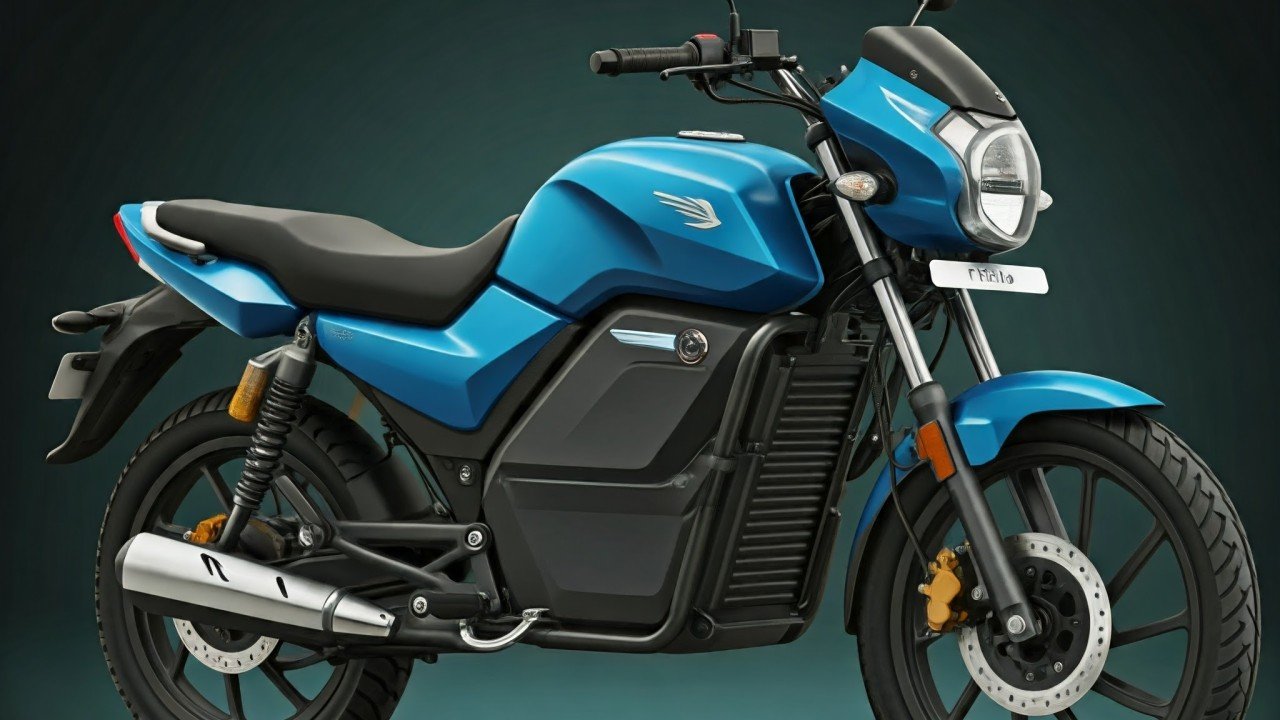
    Electric motorcycles are quickly gaining popularity, transforming the motorcycle industry. As concerns about the environment and fuel efficiency rise, more riders are looking for cleaner, quieter alternatives to traditional gasoline-powered bikes. With advancements in technology, electric motorcycles are not only environmentally friendly but also offer impressive performance and cost benefits. This post explores the rise of electric motorcycles, their benefits, and what the future holds for these two-wheeled electric machines.

    The Rise of Electric Motorcycles
    The Rise of Electric Motorcycles

    What Are Electric Motorcycles?

    Electric motorcycles are powered by electric motors and rechargeable batteries, rather than traditional internal combustion engines. These bikes offer all the thrills and excitement of regular motorcycles but without the emissions or noise. Unlike conventional motorcycles, which rely on gasoline, electric bikes use electricity stored in batteries to power the motor. This shift in technology represents a significant step towards reducing the carbon footprint of the transportation sector.

    These bikes come in various styles, from sport bikes to cruisers and touring motorcycles, catering to a broad range of riding preferences. With zero tailpipe emissions, electric bikes contribute to cleaner air and less environmental pollution, making them an attractive choice for eco-conscious riders. Additionally, the design and engineering behind electric motorcycles have become more advanced, offering better range, performance, and affordability.

    Benefits of Electric Motorcycles

    The benefits of electric bikes  are wide-ranging, making them an appealing option for both new riders and seasoned motorcyclists. One of the most significant advantages is cost savings. Electric motorcycles are much cheaper to maintain than traditional gasoline-powered motorcycles. There are fewer moving parts, meaning fewer repairs and less frequent maintenance. Charging the batteries is also significantly cheaper than purchasing gasoline, leading to lower operational costs in the long run.

    Another key benefit is environmental impact. Traditional motorcycles contribute to air pollution through their exhaust emissions, but electric bikes have zero tailpipe emissions. This makes them an excellent choice for riders who want to reduce their environmental footprint and embrace cleaner transportation options. The quiet nature of electric bikes is also worth noting. With no noisy engine, electric motorcycles provide a smoother, more peaceful riding experience, which can be a welcome change for both the rider and those around them.

    Performance and Range of Electric Motorcycles

    While electric bikes  are known for their environmental benefits, they also offer impressive performance. Many of these bikes can reach high speeds and accelerate rapidly, thanks to the instant torque produced by the electric motor. In fact, some high-performance electric motorcycles rival or even exceed the speed and power of their gas-powered counterparts. With advancements in battery technology, these bikes are now capable of longer ranges, addressing one of the common concerns for potential buyers.

    The range of electric bikes can vary depending on the model and battery size, but many are now capable of traveling between 100 and 200 miles on a single charge. Fast-charging technology is also improving, allowing riders to recharge their bikes more quickly than ever before. As charging infrastructure continues to expand, especially in urban areas, the range anxiety that once plagued electric vehicle owners is gradually diminishing.

    Challenges and Limitations of Electric Motorcycles

    Despite their numerous benefits, electric bikes face several challenges. One of the primary issues is charging infrastructure. While charging stations for electric cars are becoming more widespread, the availability of charging stations for motorcycles remains limited in some areas. This can pose a challenge for long-distance riders, especially in rural or less-developed regions.

    Additionally, while electric bikes have made significant strides in terms of performance and range, the initial cost of purchasing an electric bike can still be higher than that of a traditional motorcycle. Although the long-term savings on fuel and maintenance may offset the upfront cost, it can be a barrier for some potential buyers.

    Battery technology is also an area of ongoing development. While electric motorcycle batteries have improved, they are still heavier and take longer to charge than gasoline tanks can be refueled. Manufacturers are working hard to enhance battery efficiency, which could make electric motorcycles even more practical in the future.

    The Future of Electric Motorcycles

    The future of electric bikes looks bright. As technology continues to evolve, manufacturers are working to improve performance, reduce costs, and expand the range of these bikes. More cities are implementing sustainable transportation policies, encouraging the adoption of electric motorcycles as a viable option for urban commuting. Additionally, government incentives, such as tax credits and rebates, are helping make electric motorcycles more affordable.

    The rise of electric bikes is not just about sustainability; it’s also about changing how we experience riding. With the quiet hum of the electric motor and a more seamless riding experience, electric motorcycles offer a new way to enjoy the open road. The development of lightweight materials, improved battery efficiency, and faster charging systems will continue to make electric motorcycles a more appealing option for riders of all types.

    Conclusion

    The rise of electric motorcycles is a testament to how innovation is shaping the future of transportation. These bikes provide a cleaner, quieter alternative to traditional motorcycles while offering comparable performance and lower maintenance costs. Despite challenges like charging infrastructure and higher initial costs, the advantages of electric bikes make them an exciting option for environmentally conscious riders. As technology continues to improve, electric motorcycles will likely become an even more popular and viable mode of transportation, especially for those who value sustainability without sacrificing performance.


  • The Evolution of Gaming Consoles

    The Evolution of Gaming Consoles

    Gaming consoles have transformed dramatically since their inception, evolving from simple machines with pixelated graphics to complex systems delivering immersive experiences. This journey reflects not only the progress in technology but also the ever-growing cultural significance of gaming in our lives.


    The Early Days: The Birth of Home Gaming

    The story of gaming consoles began in the 1970s when the first home console, the Magnavox Odyssey, hit the market in 1972. This rudimentary system allowed players to control dots on the screen using overlays for different games. Shortly after, Atari introduced its Pong console in 1975, a machine dedicated to playing one iconic game.

    By the late 1970s, Atari 2600 revolutionized gaming with its interchangeable game cartridges, marking the beginning of a new era. It brought classics like Space Invaders and Pac-Man into living rooms, solidifying gaming as a popular form of entertainment.


    The 1980s: The Rise of Nintendo and Sega

    The 1980s were pivotal for gaming consoles, with Nintendo and Sega emerging as industry leaders.

    • Nintendo Entertainment System (NES): Released in 1985, the NES introduced legendary franchises like Super Mario Bros. and The Legend of Zelda. It revived the gaming industry after the crash of 1983 and set a new standard for quality and innovation.
    • Sega Genesis: Launched in 1988, Sega’s 16-bit console delivered faster processing power and introduced Sonic the Hedgehog, competing directly with Nintendo.

    This era also saw the introduction of handheld gaming, with Nintendo’s Game Boy leading the way in 1989.

    The Evolution of Gaming Consoles
    The Evolution of Gaming Consoles

    The 1990s: 3D Graphics and CD-ROMs

    As technology advanced, the 1990s brought significant changes to gaming consoles.

    • Sony PlayStation: Sony entered the gaming world in 1994 with the PlayStation, a console that utilized CDs instead of cartridges, offering more storage for detailed graphics and complex games like Final Fantasy VII.
    • Nintendo 64: Released in 1996, this console introduced 3D gaming with titles like Super Mario 64 and The Legend of Zelda: Ocarina of Time.
    • Sega Dreamcast: Though short-lived, the Dreamcast (1999) was ahead of its time, offering online gaming capabilities and a strong library of innovative games.

    The 2000s: The Era of Online Gaming

    The turn of the century marked a shift toward high-definition graphics and online multiplayer gaming.

    • Sony PlayStation 2 (PS2): Released in 2000, the PS2 became the best-selling console of all time, with an extensive library and backward compatibility with PS1 games.
    • Microsoft Xbox: Entering the scene in 2001, the Xbox introduced Xbox Live, a groundbreaking online service that redefined multiplayer gaming.
    • Nintendo Wii: Launched in 2006, the Wii brought motion controls to the forefront, attracting a broad audience, including casual gamers and families.

    The 2010s: A Focus on Power and Portability

    The 2010s saw the rise of powerful consoles and hybrid systems.

    • Sony PlayStation 4 (PS4): With enhanced graphics and an emphasis on exclusive titles, the PS4 became a dominant force in the market.
    • Microsoft Xbox One: Microsoft introduced features like cloud gaming and backward compatibility, competing head-to-head with Sony.
    • Nintendo Switch: Launched in 2017, the Switch combined handheld and traditional console gaming, delivering instant hits like The Legend of Zelda: Breath of the Wild.

    The Present Day: Immersive and Connected Gaming

    Gaming consoles today, such as the PlayStation 5 and Xbox Series X, offer cutting-edge features like ray tracing, 8K resolution, and ultra-fast load times. These consoles prioritize online connectivity, cloud gaming, and social interaction. Additionally, the rise of virtual reality (VR) systems like the PlayStation VR2 is pushing the boundaries of immersive gaming.


    The Future of Gaming Consoles

    As we look ahead, the gaming industry is likely to see further integration of artificial intelligence, augmented reality (AR), and fully cloud-based gaming systems. Companies like Microsoft and Google are exploring cloud gaming services like Xbox Cloud Gaming and Google Stadia, eliminating the need for physical hardware.


    Conclusion

    From the simplistic games of the 1970s to today’s hyper-realistic and interconnected experiences, the evolution of gaming consoles is a testament to technological progress and human creativity. Whether you’re a retro enthusiast or a modern gamer, the journey of gaming consoles offers something for everyone to appreciate.

  • Top Budget Laptops for Students in 2025

    Top Budget Laptops for Students in 2025

    As students gear up for another academic year, having a reliable laptop is more important than ever. Whether you’re attending virtual classes, working on assignments, or streaming educational videos, a good laptop is essential. Thankfully, the market is filled with budget-friendly options that don’t compromise on performance. Here’s a list of the top budget laptops for students in 2025, tailored to meet academic and personal needs.


    What to Look for in a Budget Laptop

    Before diving into the recommendations, it’s important to understand what makes a laptop ideal for students:

    • Affordability: Ideally under $700, but lower price points are even better for tighter budgets.
    • Performance: Look for at least an Intel Core i3, AMD Ryzen 3, or equivalent processor.
    • Portability: Lightweight and compact designs make it easier to carry around campus or between classes.
    • Battery Life: A minimum of 6–8 hours ensures you can go through classes without hunting for outlets.
    • Durability: A sturdy build is essential for a laptop to survive a student’s busy lifestyle.

    Top Budget Laptops for Students in 2025

    1. Acer Aspire 5

    • Price: Around $550
    • Specs: Intel Core i5, 8GB RAM, 256GB SSD, 15.6-inch Full HD Display
    • Why It’s Great: The Acer Aspire 5 offers a powerful processor and ample storage, making it ideal for multitasking and productivity. Its sleek design and reliable performance make it one of the best budget options for students.

    2. Lenovo IdeaPad Flex 3 (Chromebook)

    • Price: Around $350
    • Specs: MediaTek Kompanio 500, 4GB RAM, 64GB eMMC, 11.6-inch HD Touch Display
    • Why It’s Great: Perfect for students on a tight budget, this Chromebook delivers quick boot times and excellent portability. The 2-in-1 design adds versatility for note-taking and presentations.

    3. HP Pavilion x360

    • Price: Around $650
    • Specs: Intel Core i3, 8GB RAM, 128GB SSD, 14-inch Full HD Touchscreen
    • Why It’s Great: This convertible laptop is great for students who need flexibility. Use it as a laptop for typing assignments or as a tablet for reading and sketching.

    4. ASUS VivoBook 15

    • Price: Around $600
    • Specs: AMD Ryzen 5, 8GB RAM, 512GB SSD, 15.6-inch Full HD Display
    • Why It’s Great: With a large storage capacity and a strong AMD processor, the VivoBook 15 is a well-rounded option for students who want a bit more power without breaking the bank.
    As students gear up for another academic year, having a reliable laptop is more important than ever. Whether you’re attending virtual classes, working on assignments, or streaming educational videos, a good laptop is essential. Thankfully, the market is filled with budget-friendly options that don’t compromise on performance. Here’s a list of the top budget laptops for students in 2025, tailored to meet academic and personal needs.What to Look for in a Budget Laptop
Before diving into the recommendations, it’s important to understand what makes a laptop ideal for students:

Affordability: Ideally under $700, but lower price points are even better for tighter budgets.
Performance: Look for at least an Intel Core i3, AMD Ryzen 3, or equivalent processor.
Portability: Lightweight and compact designs make it easier to carry around campus or between classes.
Battery Life: A minimum of 6–8 hours ensures you can go through classes without hunting for outlets.
Durability: A sturdy build is essential for a laptop to survive a student’s busy lifestyle.
Top Budget Laptops for Students in 2025
1. Acer Aspire 5
Price: Around $550
Specs: Intel Core i5, 8GB RAM, 256GB SSD, 15.6-inch Full HD Display
Why It’s Great: The Acer Aspire 5 offers a powerful processor and ample storage, making it ideal for multitasking and productivity. Its sleek design and reliable performance make it one of the best budget options for students.
2. Lenovo IdeaPad Flex 3 (Chromebook)
Price: Around $350
Specs: MediaTek Kompanio 500, 4GB RAM, 64GB eMMC, 11.6-inch HD Touch Display
Why It’s Great: Perfect for students on a tight budget, this Chromebook delivers quick boot times and excellent portability. The 2-in-1 design adds versatility for note-taking and presentations.
3. HP Pavilion x360
Price: Around $650
Specs: Intel Core i3, 8GB RAM, 128GB SSD, 14-inch Full HD Touchscreen
Why It’s Great: This convertible laptop is great for students who need flexibility. Use it as a laptop for typing assignments or as a tablet for reading and sketching.
4. ASUS VivoBook 15
Price: Around $600
Specs: AMD Ryzen 5, 8GB RAM, 512GB SSD, 15.6-inch Full HD Display
Why It’s Great: With a large storage capacity and a strong AMD processor, the VivoBook 15 is a well-rounded option for students who want a bit more power without breaking the bank.
5. Dell Inspiron 14 3000
Price: Around $450
Specs: Intel Core i3, 8GB RAM, 256GB SSD, 14-inch HD Display
Why It’s Great: Compact and reliable, the Dell Inspiron 14 3000 series is perfect for students who value simplicity and efficiency. It offers all the essentials for a great price.
Honorable Mentions
Samsung Galaxy Chromebook 2
Price: Around $600
Specs: Intel Celeron, 4GB RAM, 64GB eMMC, 13.3-inch QLED Display
Why It’s Great: The vivid QLED screen is perfect for students who need an immersive display for video editing or streaming lectures.
Microsoft Surface Laptop Go 2
Price: Around $700
Specs: Intel Core i5, 8GB RAM, 128GB SSD, 12.4-inch Touch Display
Why It’s Great: Compact, lightweight, and stylish, this Surface Laptop is ideal for students looking for a premium feel on a budget.
Tips for Choosing the Right Laptop
Assess Your Needs: If you’re primarily browsing, taking notes, and streaming, Chromebooks are a great budget option. For coding or design work, aim for better processors and larger storage.
Check for Student Discounts: Many brands and retailers offer student-specific discounts. Always check for deals through platforms like Amazon, Best Buy, or directly on manufacturer websites.
Consider Refurbished Models: Refurbished laptops can save you significant money while providing excellent performance.
Conclusion
With so many excellent budget laptops on the market in 2025, students have plenty of options to choose from without overspending. Prioritize your specific needs, such as portability, performance, or durability, and pick the model that best fits your academic lifestyle. With the right laptop, you’ll be equipped for success both inside and outside the classroom.
    As students gear up for another academic year, having a reliable laptop is more important than ever. Whether you’re attending virtual classes, working on assignments, or streaming educational videos, a good laptop is essential. Thankfully, the market is filled with budget-friendly options that don’t compromise on performance. Here’s a list of the top budget laptops for students in 2025, tailored to meet academic and personal needs.
    What to Look for in a Budget Laptop
    Before diving into the recommendations, it’s important to understand what makes a laptop ideal for students:
    Affordability: Ideally under $700, but lower price points are even better for tighter budgets.
    Performance: Look for at least an Intel Core i3, AMD Ryzen 3, or equivalent processor.
    Portability: Lightweight and compact designs make it easier to carry around campus or between classes.
    Battery Life: A minimum of 6–8 hours ensures you can go through classes without hunting for outlets.
    Durability: A sturdy build is essential for a laptop to survive a student’s busy lifestyle.
    Top Budget Laptops for Students in 2025
    1. Acer Aspire 5
    Price: Around $550
    Specs: Intel Core i5, 8GB RAM, 256GB SSD, 15.6-inch Full HD Display
    Why It’s Great: The Acer Aspire 5 offers a powerful processor and ample storage, making it ideal for multitasking and productivity. Its sleek design and reliable performance make it one of the best budget options for students.
    2. Lenovo IdeaPad Flex 3 (Chromebook)
    Price: Around $350
    Specs: MediaTek Kompanio 500, 4GB RAM, 64GB eMMC, 11.6-inch HD Touch Display
    Why It’s Great: Perfect for students on a tight budget, this Chromebook delivers quick boot times and excellent portability. The 2-in-1 design adds versatility for note-taking and presentations.
    3. HP Pavilion x360
    Price: Around $650
    Specs: Intel Core i3, 8GB RAM, 128GB SSD, 14-inch Full HD Touchscreen
    Why It’s Great: This convertible laptop is great for students who need flexibility. Use it as a laptop for typing assignments or as a tablet for reading and sketching.
    4. ASUS VivoBook 15
    Price: Around $600
    Specs: AMD Ryzen 5, 8GB RAM, 512GB SSD, 15.6-inch Full HD Display
    Why It’s Great: With a large storage capacity and a strong AMD processor, the VivoBook 15 is a well-rounded option for students who want a bit more power without breaking the bank.
    5. Dell Inspiron 14 3000
    Price: Around $450
    Specs: Intel Core i3, 8GB RAM, 256GB SSD, 14-inch HD Display
    Why It’s Great: Compact and reliable, the Dell Inspiron 14 3000 series is perfect for students who value simplicity and efficiency. It offers all the essentials for a great price.
    Honorable Mentions
    Samsung Galaxy Chromebook 2
    Price: Around $600
    Specs: Intel Celeron, 4GB RAM, 64GB eMMC, 13.3-inch QLED Display
    Why It’s Great: The vivid QLED screen is perfect for students who need an immersive display for video editing or streaming lectures.
    Microsoft Surface Laptop Go 2
    Price: Around $700
    Specs: Intel Core i5, 8GB RAM, 128GB SSD, 12.4-inch Touch Display
    Why It’s Great: Compact, lightweight, and stylish, this Surface Laptop is ideal for students looking for a premium feel on a budget.
    Tips for Choosing the Right Laptop
    Assess Your Needs: If you’re primarily browsing, taking notes, and streaming, Chromebooks are a great budget option. For coding or design work, aim for better processors and larger storage.
    Check for Student Discounts: Many brands and retailers offer student-specific discounts. Always check for deals through platforms like Amazon, Best Buy, or directly on manufacturer websites.
    Consider Refurbished Models: Refurbished laptops can save you significant money while providing excellent performance.
    Conclusion
    With so many excellent budget laptops on the market in 2025, students have plenty of options to choose from without overspending. Prioritize your specific needs, such as portability, performance, or durability, and pick the model that best fits your academic lifestyle. With the right laptop, you’ll be equipped for success both inside and outside the classroom.

    5. Dell Inspiron 14 3000

    • Price: Around $450
    • Specs: Intel Core i3, 8GB RAM, 256GB SSD, 14-inch HD Display
    • Why It’s Great: Compact and reliable, the Dell Inspiron 14 3000 series is perfect for students who value simplicity and efficiency. It offers all the essentials for a great price.

    Honorable Mentions

    Samsung Galaxy Chromebook 2

    • Price: Around $600
    • Specs: Intel Celeron, 4GB RAM, 64GB eMMC, 13.3-inch QLED Display
    • Why It’s Great: The vivid QLED screen is perfect for students who need an immersive display for video editing or streaming lectures.

    Microsoft Surface Laptop Go 2

    • Price: Around $700
    • Specs: Intel Core i5, 8GB RAM, 128GB SSD, 12.4-inch Touch Display
    • Why It’s Great: Compact, lightweight, and stylish, this Surface Laptop is ideal for students looking for a premium feel on a budget.

    Tips for Choosing the Right Laptop

    1. Assess Your Needs: If you’re primarily browsing, taking notes, and streaming, Chromebooks are a great budget option. For coding or design work, aim for better processors and larger storage.
    2. Check for Student Discounts: Many brands and retailers offer student-specific discounts. Always check for deals through platforms like Amazon, Best Buy, or directly on manufacturer websites.
    3. Consider Refurbished Models: Refurbished laptops can save you significant money while providing excellent performance.

    Conclusion

    With so many excellent budget laptops on the market in 2025, students have plenty of options to choose from without overspending. Prioritize your specific needs, such as portability, performance, or durability, and pick the model that best fits your academic lifestyle. With the right laptop, you’ll be equipped for success both inside and outside the classroom.

  • How to Upgrade Your Computer for Gaming

    How to Upgrade Your Computer for Gaming

    Gaming on a computer requires powerful hardware for smooth performance and immersive visuals. If your current setup struggles to handle modern games, upgrading key components can significantly improve your gaming experience. This guide explains how to upgrade your computer for gaming, focusing on essential parts and practical tips.

    How to Upgrade Your Computer for Gaming
    How to Upgrade Your Computer for Gaming

    Why Upgrade Your Computer for Gaming?

    Upgrading your computer enhances performance, reduces lag, and ensures compatibility with the latest games. Benefits include:

    • Improved graphics: Enjoy stunning visuals with higher resolutions and details.
    • Faster performance: Reduce load times and improve frame rates.
    • Extended lifespan: Keep your computer relevant for future games.

    What Are the Most Important Components to Upgrade?

    1. Graphics Card (GPU)

    Why Upgrade the GPU?

    The graphics card is the heart of any gaming PC. It processes visuals and ensures smooth gameplay.

    How to Choose the Right GPU

    • Compatibility: Check your motherboard and power supply requirements.
    • Performance: Choose a GPU that supports your desired resolution and refresh rate.
    • Popular Options: NVIDIA GeForce and AMD Radeon offer excellent choices for gamers.

    Installation Tips

    • Turn off the computer and disconnect the power supply.
    • Remove the old GPU and insert the new one into the PCIe slot.
    • Secure it in place and connect power cables if required.

    2. RAM (Memory)

    Why Upgrade RAM?

    More RAM allows your system to handle multitasking and run games smoothly.

    How Much RAM Do You Need?

    • 8GB: Basic gaming.
    • 16GB: Ideal for most modern games.
    • 32GB: Best for heavy multitasking and streaming.

    Installation Tips

    • Identify compatible RAM types (DDR4 or DDR5).
    • Insert the new RAM into the designated slots on your motherboard.

    3. Storage

    Why Upgrade Storage?

    Faster storage improves game load times and system responsiveness.

    SSD vs. HDD

    • SSD (Solid-State Drive): Offers faster load times and better performance.
    • HDD (Hard Disk Drive): Provides larger storage capacity at a lower cost.

    Installation Tips

    • Use an SSD for your operating system and frequently played games.
    • Install additional HDDs for bulk storage.

    4. Processor (CPU)

    Why Upgrade the CPU?

    The CPU handles game logic and background tasks, ensuring a seamless experience.

    How to Choose the Right CPU

    • Core Count: Look for at least 4-6 cores for gaming.
    • Clock Speed: Higher speeds improve performance.
    • Compatibility: Ensure the CPU matches your motherboard socket.

    Installation Tips

    • Apply thermal paste before attaching the CPU cooler.
    • Secure the processor in the motherboard’s socket.

    Should You Upgrade Your Cooling System?

    Gaming PCs generate heat, especially with upgraded components. A good cooling system prevents overheating and maintains performance.

    Cooling Options

    • Air Cooling: Affordable and effective for most setups.
    • Liquid Cooling: Ideal for high-performance gaming PCs.

    How to Ensure Power Supply Compatibility?

    Upgraded components require more power.

    • Check Wattage: Ensure your power supply unit (PSU) provides enough power for the new parts.
    • Consider Efficiency: Opt for 80 Plus certified PSUs for reliability.

    Additional Accessories for Enhanced Gaming

    1. Gaming Monitor

    Upgrade to a monitor with a high refresh rate and low response time for smoother visuals.

    2. Gaming Keyboard and Mouse

    Invest in peripherals with customizable features for a better gaming experience.

    3. Headset

    A quality gaming headset enhances immersion with clear audio.

    Final Thoughts

    Upgrading your computer for gaming doesn’t have to be overwhelming. Focus on key components like the GPU, CPU, RAM, and storage to maximize performance. Remember to check compatibility and follow installation guides carefully. With the right upgrades, you can enjoy smoother gameplay, stunning visuals, and a competitive edge in every game.

  • A Guide to Understanding OLED vs. LED TVs

    A Guide to Understanding OLED vs. LED TVs

    When shopping for a new television, you’ve likely come across two popular display technologies: OLED and LED. While both deliver exceptional visuals, they differ significantly in how they function, their features, and their ideal use cases. This guide will help you understand the differences between OLED and LED TVs to make an informed decision for your home entertainment setup.


    What Are OLED and LED TVs?

    LED TVs

    LED (Light Emitting Diode) TVs are a subset of LCD (Liquid Crystal Display) TVs that use LEDs as a backlight. These lights illuminate the pixels, which then produce the image you see on the screen. LED TVs have been a staple in the market for years due to their affordability, brightness, and wide availability.

    OLED TVs

    OLED (Organic Light Emitting Diode) TVs are a newer technology where each pixel emits its light. Unlike LED TVs, OLEDs do not require a backlight, allowing for more precise control over each pixel. This innovation delivers unparalleled contrast and color accuracy.


    Key Differences Between OLED and LED TVs

    1. Picture Quality

    • OLED TVs: Known for their deep blacks and infinite contrast ratio, OLED displays can turn off individual pixels, resulting in true black levels. This feature also enhances overall color vibrancy.
    • LED TVs: While LED TVs can deliver impressive brightness levels, their contrast is limited because the backlight can’t turn off individual pixels completely.

    2. Brightness

    • LED TVs: Excel in brightness, making them ideal for well-lit rooms or outdoor use. Advanced LED models like QLED (Quantum Dot LED) improve brightness further.
    • OLED TVs: Though bright, OLED TVs are slightly dimmer than LEDs, particularly in brightly lit environments. However, their superior contrast often compensates for this.

    3. Viewing Angles

    • OLED TVs: Offer excellent viewing angles, with minimal color or brightness degradation, no matter where you’re sitting.
    • LED TVs: Performance may vary depending on the model. Many LED TVs exhibit a loss in color and contrast when viewed from the side.
    A Guide to Understanding OLED vs. LED TVs
    A Guide to Understanding OLED vs. LED TVs

    4. Lifespan and Burn-In Risk

    • LED TVs: Generally have a longer lifespan and are less prone to issues like image retention or burn-in.
    • OLED TVs: While newer OLEDs have improved in durability, they can still experience burn-in with static images over prolonged periods.

    5. Price

    • LED TVs: More budget-friendly and available across a wide price range, from entry-level models to premium QLEDs.
    • OLED TVs: Tend to be more expensive due to their advanced technology and manufacturing process.

    6. Size Options

    • LED TVs: Available in a broad range of sizes, from small screens for kitchens to massive displays for home theaters.
    • OLED TVs: Usually start at 48 inches and are best suited for larger formats.

    Pros and Cons

    OLED TVs

    Pros:

    • Superior picture quality
    • Deep blacks and vibrant colors
    • Wider viewing angles

    Cons:

    • Higher cost
    • Slight risk of burn-in

    LED TVs

    Pros:

    • Affordable pricing
    • Excellent brightness for bright rooms
    • No burn-in risk

    Cons:

    • Limited contrast and black levels
    • Reduced viewing angles

    Which TV Is Right for You?

    Choose OLED If:

    • You prioritize top-tier picture quality and deep blacks.
    • You watch movies or play video games in a dark room.
    • You want a sleek, thin design that complements modern interiors.

    Choose LED If:

    • You need a bright screen for well-lit rooms.
    • You’re on a budget or looking for a wide size range.
    • You want a TV for general-purpose use, including static content like news or sports.

    Conclusion

    Both OLED and LED TVs offer distinct advantages, catering to different needs and preferences. While OLED excels in delivering premium picture quality and immersive visuals, LED TVs remain a versatile and cost-effective choice. Assess your viewing habits, room lighting, and budget to determine the best fit for your home.

    Investing in the right TV ensures years of high-quality entertainment tailored to your lifestyle.

  • Best Tech Accessories for Everyday Use

    Best Tech Accessories for Everyday Use

    Tech accessories have become essential in our daily lives, making tasks easier and enhancing productivity. Whether you’re working, studying, or relaxing, the right gadgets can streamline your activities. This guide explores the best tech accessories for everyday use and how they improve your routine.

    Best Tech Accessories for Everyday Use
    Best Tech Accessories for Everyday Use

    Why Are Tech Accessories Important?

    Tech accessories bridge the gap between convenience and functionality. They:

    • Improve device performance.
    • Add convenience to daily tasks.
    • Enhance productivity and entertainment experiences.

    What Are the Best Accessories for Mobile Devices?

    1. Wireless Chargers

    No more fumbling with cables! Wireless chargers are perfect for keeping your smartphone powered up effortlessly.

    • Benefits:
      • Easy to use.
      • Reduces wear and tear on charging ports.
    • Popular Options: Look for chargers with fast-charging capabilities and compatibility with multiple devices.

    2. Power Banks

    Stay connected on the go with a reliable power bank.

    • Benefits:
      • Provides portable charging.
      • Essential for travelers or busy days.
    • Key Features: Opt for high-capacity models with fast charging and multiple USB ports.

    3. Phone Stands and Holders

    Perfect for hands-free viewing during video calls or streaming.

    • Uses:
      • Ideal for desks and car dashboards.
      • Adjustable angles for better viewing.

    How Can Accessories Improve Work Productivity?

    1. Ergonomic Keyboards and Mice

    Typing and navigation are much easier with ergonomic devices.

    • Benefits:
      • Reduces strain on wrists and hands.
      • Enhances comfort for long hours.
    • Recommended Features: Wireless connectivity and customizable buttons for added convenience.

    2. Laptop Stands

    Elevate your laptop for better posture and cooling.

    • Advantages:
      • Promotes ergonomic desk setups.
      • Prevents overheating.
    • Tip: Choose adjustable models for versatility.

    3. Noise-Canceling Headphones

    Focus without distractions using noise-canceling headphones.

    • Why You Need Them:
      • Blocks out background noise.
      • Enhances audio clarity during meetings or entertainment.
    • Top Picks: Look for wireless models with long battery life.

    What Accessories Are Perfect for Entertainment?

    1. Bluetooth Speakers

    Enjoy high-quality audio anywhere with portable Bluetooth speakers.

    • Features to Look For:
      • Waterproof models for outdoor use.
      • Long-lasting battery life.

    2. Streaming Devices

    Turn any TV into a smart entertainment hub with streaming devices like Roku or Chromecast.

    • Benefits:
      • Access to countless apps and channels.
      • Affordable compared to smart TVs.

    Are Smart Home Devices Worth It?

    1. Smart Plugs

    Control appliances with your smartphone or voice assistant.

    • Advantages:
      • Saves energy.
      • Adds convenience to daily tasks.

    2. Smart Bulbs

    Adjust brightness and color to suit your mood.

    • Key Features:
      • Voice control compatibility.
      • Energy efficiency.

    How to Choose the Right Tech Accessories?

    • Consider Your Needs: Think about your lifestyle and daily habits.
    • Research Compatibility: Ensure the accessory works with your existing devices.
    • Focus on Quality: Invest in durable, reliable brands.

    Final Thoughts

    The best tech accessories combine practicality and innovation to enhance your daily life. From boosting productivity to upgrading entertainment, these gadgets are invaluable. Choose wisely and enjoy the benefits of a tech-empowered routine.

  • The Benefits of Wireless Charging Technology

    The Benefits of Wireless Charging Technology

    The rise of wireless charging technology has transformed how we power our devices. By eliminating the need for traditional cables, wireless charging offers convenience and efficiency for modern lifestyles. Here are the key benefits of embracing wireless charging technology and why it’s becoming a must-have for device users worldwide.

    1. Convenience and Ease of Use

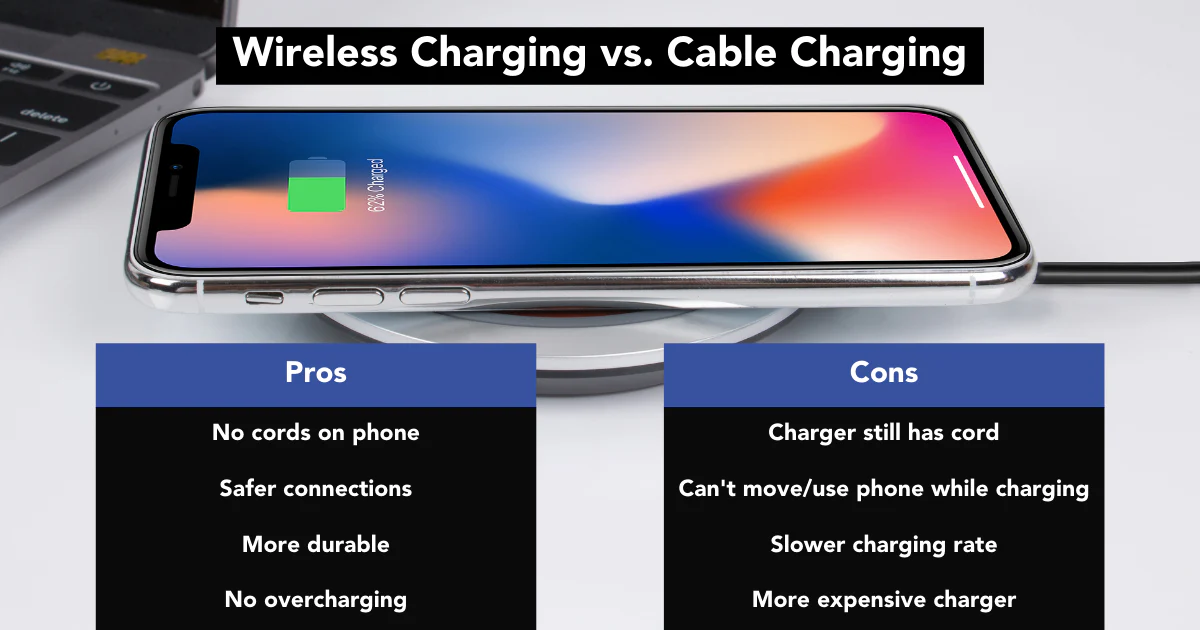
    One of the most significant advantages of wireless charging is its simplicity. Place your device on a charging pad, and it begins charging—no more fumbling with cables or figuring out which side is up. This ease of use makes it especially appealing for those constantly on the move.

    • No need for plugging and unplugging cables
    • Ideal for nighttime charging or multitasking at work
    • Compatible with a wide range of devices, including smartphones, smartwatches, and earbuds

    2. Reduces Cable Clutter

    Tangled cords and messy charging stations are a thing of the past with wireless technology. By switching to wireless chargers, you can create a clean and organized space. This is particularly beneficial for:

    • Workspaces that require minimal distractions
    • Living areas where aesthetics matter
    • Shared charging hubs for families or offices

    3. Enhances Device Longevity

    Frequent plugging and unplugging can wear out charging ports over time, potentially leading to expensive repairs. Wireless charging eliminates this risk by reducing the mechanical strain on your devices.

    • Protects ports from wear and tear
    • Reduces the chance of port-related failures
    • Ideal for devices like water-resistant phones that rely on sealed ports

    4. Improved Safety Features

    Wireless chargers often come with built-in safety mechanisms to protect your devices. Features like overcharge protection, temperature control, and foreign object detection ensure safe and efficient charging.

    • Prevents overheating of devices
    • Avoids power surges and electrical shorts
    • Safer option in homes with children or pets
    The Benefits of Wireless Charging Technology
    The Benefits of Wireless Charging Technology

    5. Supports a Wide Range of Devices

    Modern wireless chargers, particularly those using the Qi standard, support a broad array of devices. This means you can charge multiple gadgets on a single pad or station, from smartphones to earbuds and smartwatches.

    • Universal compatibility with Qi-enabled devices
    • Multi-device chargers available for added convenience
    • Future-proof technology for upcoming wireless-enabled gadgets

    6. Promotes Future-Ready Technology

    Wireless charging is rapidly evolving and is at the forefront of the smart home revolution. Innovations like integrated furniture chargers and long-range wireless charging pave the way for an even more seamless future.

    • Smart desks and tables with built-in charging
    • Advances in long-range wireless charging technologies
    • Integration with eco-friendly energy solutions

    7. Reduces Wear and Tear on Cables

    Cables are prone to damage, especially with regular use and poor handling. By reducing dependence on traditional charging cables, wireless technology saves you money and hassle.

    • Fewer cables to replace
    • Environmentally friendly by reducing electronic waste
    • Ensures a consistent charging experience

    8. A Step Toward a Wireless Ecosystem

    Wireless charging complements the broader trend of cable-free living, aligning with technologies like Bluetooth headphones, smart TVs, and wireless data transfer. It’s a natural step for those who want to embrace modern, connected lifestyles.

    • Enhances compatibility with wireless gadgets
    • Reduces dependency on multiple accessories
    • Seamless integration with other smart technologies

    Conclusion

    Wireless charging technology is more than just a modern convenience; it’s a game-changer for how we interact with our devices. From reducing clutter and enhancing safety to supporting multiple devices and promoting eco-friendliness, the benefits of wireless charging are undeniable. As the technology continues to advance, adopting wireless charging ensures you stay ahead in an increasingly wireless world.